
This guide shows how to set up a telephone line (VoIP) on an ONU. The customer connects a telephone to the phone port (POTS port) of the ONU. The ONU then registers on your SIP server, for example a PBX or a softswitch, with the phone number and the password that you set in SmartOLT.
You prepare the OLT once, and then you configure each ONU:
- On the OLT, add a VLAN for management and VoIP, if the VoIP traffic does not use the internet connection (WAN) of the ONU.
- Tag this VLAN on the uplink port that goes to your router.
- Add a VoIP profile with the address of your SIP server.
- On the ONU page, enable the VoIP service and attach it to the management interface or to the WAN.
- On the ONU page, configure the phone port with the phone number and the SIP password.
The ONU type must have phone ports. If it has none, the ONU page does not show the VoIP service row. The SIP account must also exist on your SIP server, because SmartOLT only sends the account data to the ONU.
Administrators can add VoIP profiles. Other users need a role that allows them to manage VoIP profiles. To change VoIP on an ONU, a user needs the right to update the ONU management and VoIP IP.
1Add a VLAN for management and VoIP
The ONU can send the VoIP traffic in two ways:
| Attach VoIP to | How the VoIP traffic leaves the ONU |
|---|---|
| Mgmt | Through the management interface of the ONU, in the management VLAN and with the management IP. Choose it when your SIP server is in your management network. |
| WAN | Through the internet connection of the customer, in the WAN VLAN. Choose it when the ONU reaches the SIP server through the internet. You do not need a separate VLAN for this. |
For Mgmt, the OLT needs a VLAN with the Management/VoIP VLAN option. If your ONUs already use a management VLAN for TR-069, you can use the same VLAN for VoIP. Otherwise, go to Settings → OLTs, click View on the OLT, open the VLANs tab and click Add VLAN.
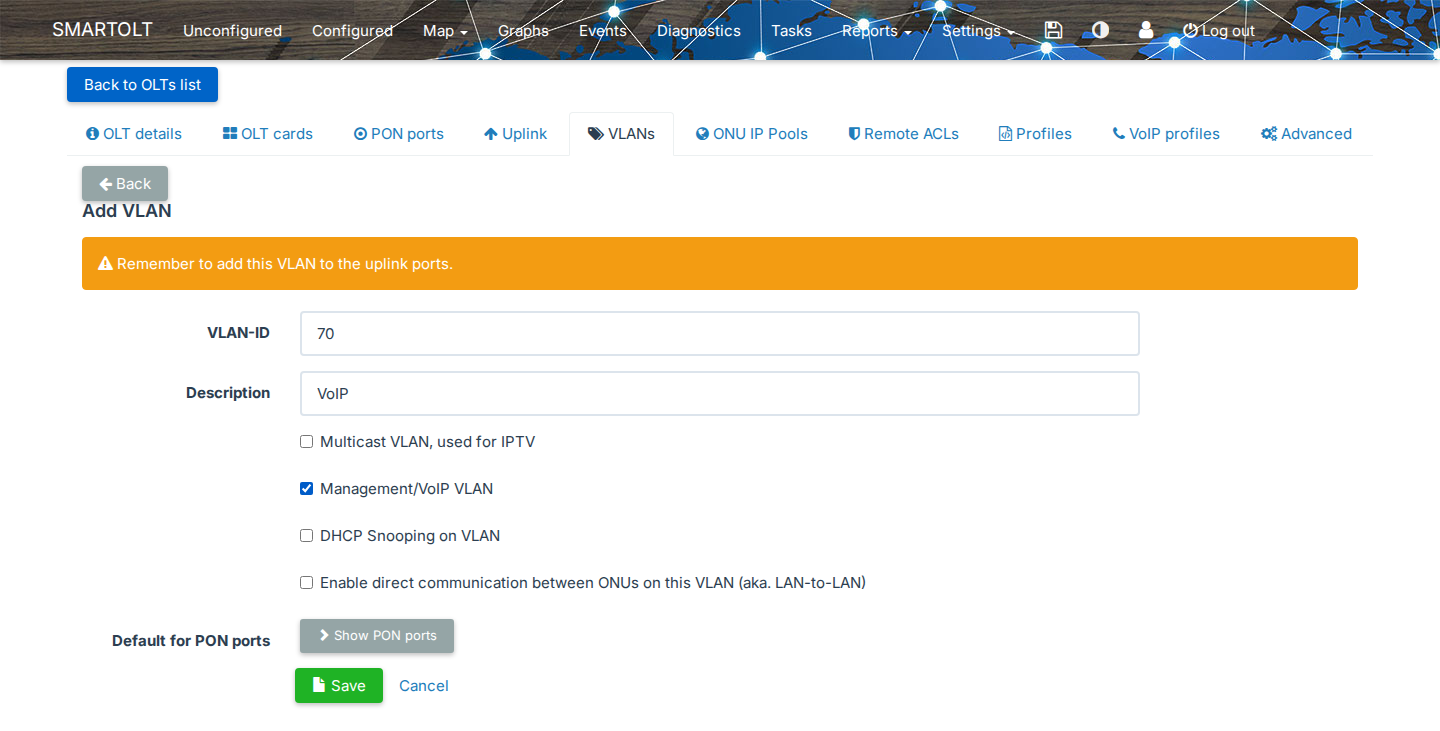
| Field | What to set |
|---|---|
| VLAN-ID | The VLAN that carries the VoIP traffic, for example 70. |
| Description | Optional, for example VoIP. |
| Management/VoIP VLAN | Select it. Only VLANs with this option appear in the management and VoIP VLAN lists of the ONU. |
Click Save. For all the fields of this form, see OLT VLANs and IP pools.
2Tag the VLAN on the uplink port
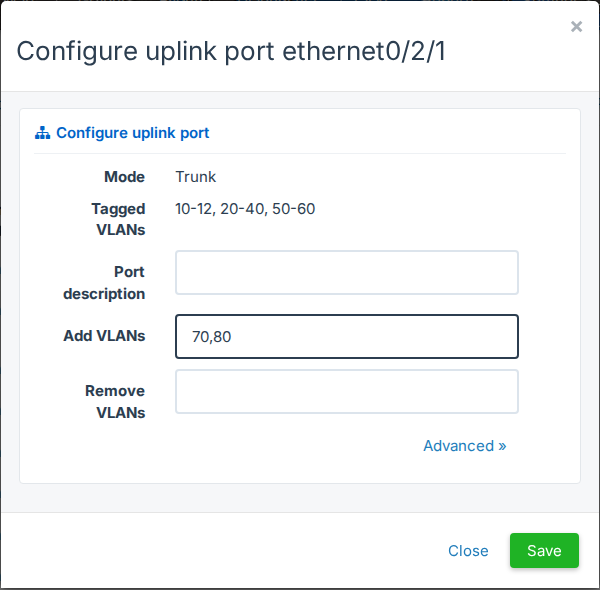
SmartOLT does not add a new VLAN to the uplink ports, so the form shows Remember to add this VLAN to the uplink ports. Open the Uplink tab and click Configure on the port that goes to your router. In Add VLANs, type the VLAN, for example 70, and click Save.
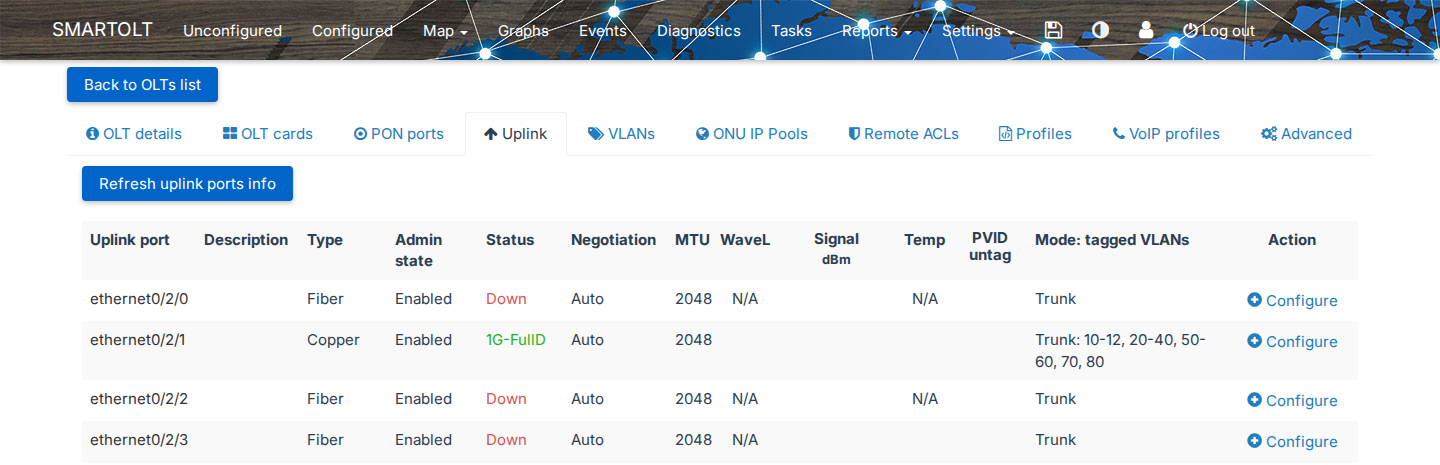
The Uplink tab now shows the VLAN in the Mode: tagged VLANs column of the port.
3Add a VoIP profile
A VoIP profile holds the data of one SIP server. You add it once for each OLT, and then you select it for each phone port. Open the VoIP profiles tab of the OLT and click Add VoIP profile.
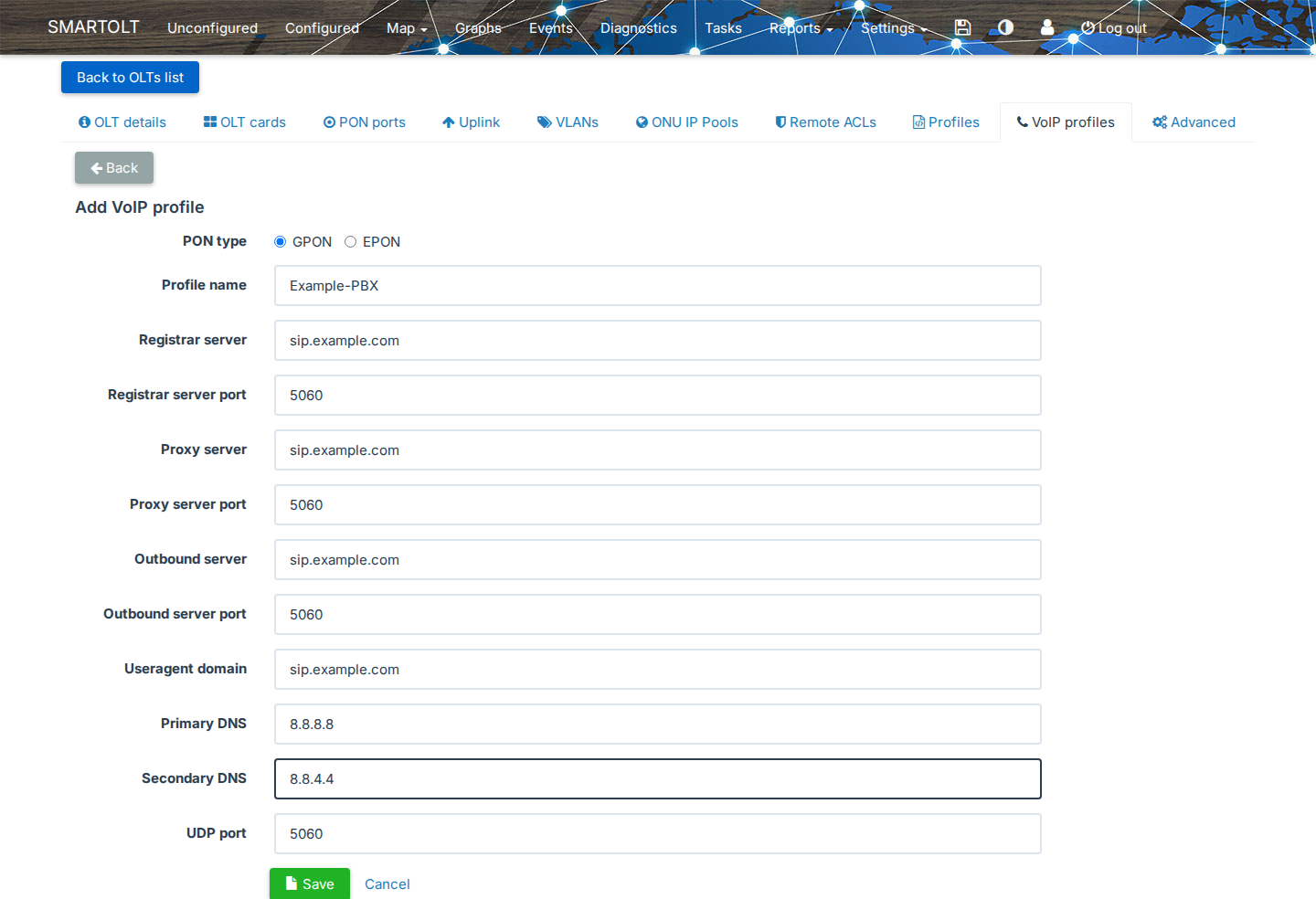
| Field | What to set |
|---|---|
| PON type | GPON or EPON, the same as the ONUs that use the profile. |
| Profile name | A name, for example Example-PBX. Use only letters, numbers and the dash (-), without spaces. Each name can exist only once on the OLT. |
| Registrar server, Registrar server port | The SIP server where the ONU registers, as a host name or an IPv4 address, and its port, usually 5060. |
| Proxy server, Proxy server port | The SIP proxy. If your SIP server has no separate proxy, use the registrar server again. |
| Outbound server, Outbound server port | The outbound proxy. If you do not use one, use the registrar server again. |
| Useragent domain | Optional. The SIP domain of the accounts, as a full domain name. |
| Primary DNS, Secondary DNS | The DNS servers that the ONU uses to find the SIP server. Primary DNS is required. If you leave Secondary DNS empty, SmartOLT uses the primary DNS for it. |
| UDP port | The local SIP port of the ONU, usually 5060. |
Click Save. SmartOLT sends the profile to the OLT and shows VoIP profile was added. The profile appears in the list.
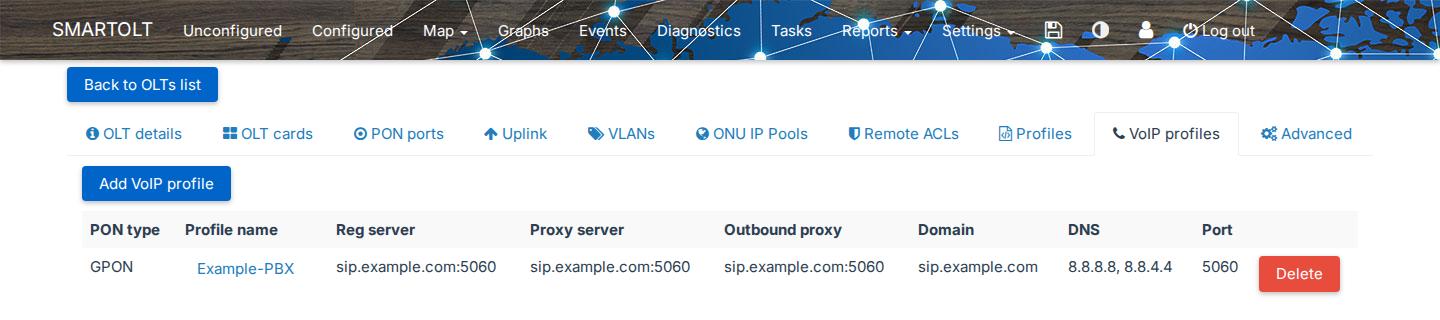
The form can show these errors:
| Error | Cause |
|---|---|
| The VoIP profile name field is required and can contain only alphanumeric characters and the dash (-) character | The name is empty, or it has spaces or other characters. |
| Profile name should be unique. | The OLT already has a profile with this name. |
| Registrar server is not a valid IP address | The profile is for EPON, and EPON profiles accept only IPv4 addresses, not host names. The same check applies to the proxy, outbound and DNS servers. |
| Useragent domain is not a valid FQDN domain. | The domain is not a valid full domain name. |
4Enable the VoIP service on the ONU
Open the ONU page. The VoIP service row shows Disabled while VoIP is off.

Click Disabled next to VoIP service, and the Update Management and VoIP IP window opens. The VoIP service section is at the bottom of the window.
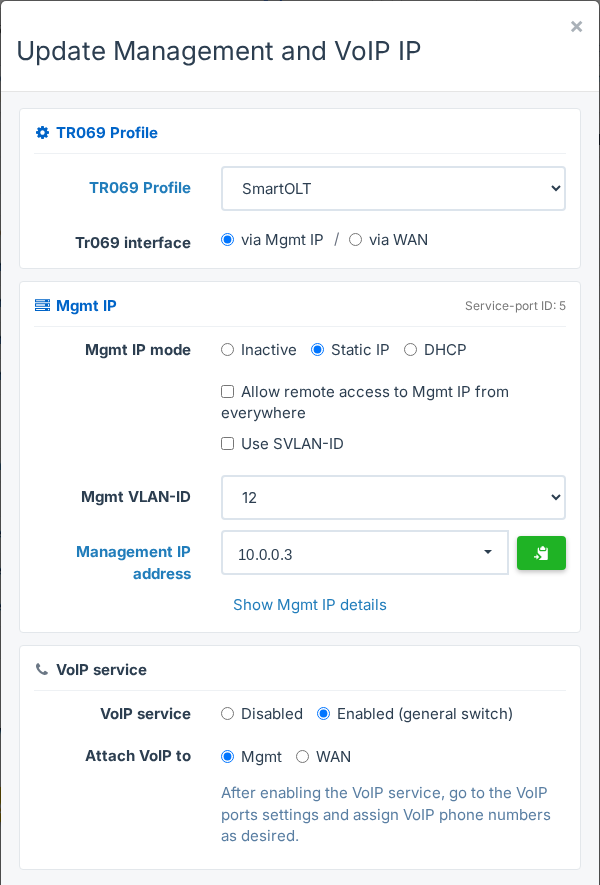
| Field | What to set |
|---|---|
| VoIP service | Enabled (general switch). This switch turns VoIP on for the whole ONU. You configure the phone ports in the next step. |
| Attach VoIP to | Mgmt or WAN, as described in step 1. Mgmt is not available on EPON ONUs. |
The same window also holds the TR-069 profile and the management IP of the ONU. Leave these fields as they are, unless you want to change them. With Mgmt, the Mgmt IP section must be active, otherwise SmartOLT shows Please enable the Mgmt IP address or disable VoIP binding to Mgmt.
Click Update. The VoIP service row now shows Enabled, and a VoIP table with the phone ports of the ONU appears under it.
On some networks, VoIP must have its own IP address and VLAN, separate from management. An administrator can turn on Separate IP-hosts for VoIP/Mgmt in the Advanced tab of the OLT. Then the window has a VoIP IP section with its own VoIP VLAN-ID and IP mode (DHCP or Static IP), and Attach VoIP to has a third option, VoIP, on GPON ONUs. A static VoIP IP comes from the VoIP IP pools of the OLT. The management VLAN and the VoIP VLAN cannot be the same, otherwise SmartOLT shows Mgmt Vlan and VoIP vlan can't be the same.
5Configure the phone port
In the VoIP table, each phone port has one row, for example pots_0/1. Until you configure the port, Number shows Not defined and the Action column shows Enable.

Click Enable on the port, and the Enable VoIP window opens.
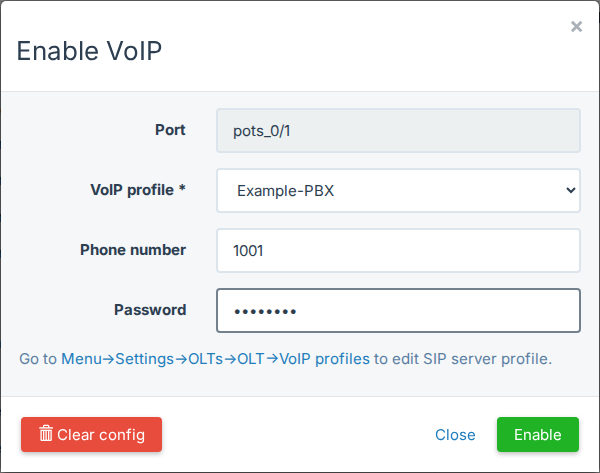
| Field | What to set |
|---|---|
| Port | The phone port. You cannot change it. |
| VoIP profile * | The VoIP profile of the SIP server, from step 3. The list shows the profiles of the OLT for the PON type of the ONU. |
| Phone number | The phone number of the customer. The ONU also uses it as the SIP user name, unless you fill in SIP userid. |
| SIP userid | This field appears only when the OLT shows the SIP User-ID field, see step 6. |
| Password | The SIP password of the account, without spaces. |
Click Enable. SmartOLT sends the settings to the ONU and shows VoIP port pots_0/1 enabled. The row now shows the profile, the number and the status Enabled.

The window can show these errors:
| Error | Cause |
|---|---|
| The Phone number field can contain only numbers and the following characters: +.@_-. A maximum of 50 non space characters is allowed. | The phone number has letters or other characters, for example acct-38512345678. In this case, use the SIP userid field. |
| Please input a valid value for the password. A maximum of ... non space characters is allowed. | The password is empty, too long, or it has spaces. |
To change the port later, click Configure on it, change the fields and click Save. Disable turns the port off on the ONU and keeps its settings in SmartOLT, so you can enable it again later.
Clear config, in the Enable VoIP window, deletes the profile, the number and the password of the port from SmartOLT. It does not send a change to the ONU, so click Disable on the port first, and then use Clear config.
SmartOLT sends the phone port settings and the SIP data to the ONU through the OLT (OMCI). On a Huawei OLT, when TR-069 is enabled on the ONU, SmartOLT also sends the voice settings through the TR-069 server (ACS). With Attach VoIP to set to VoIP on a Huawei OLT, SmartOLT sends nothing through the OLT, so the ONU must have TR-069 enabled. On a ZTE OLT, the separate VoIP IP host is configured through the OLT.
6Use a SIP user that is not the phone number
Some SIP servers use an account name that is not the phone number, for example acct-38512345678. The Phone number field does not accept such a name. For these accounts, the Enable VoIP window has an extra field, SIP userid, but only when the OLT shows it.
To show the field, an administrator opens the Advanced tab of the OLT, clicks Edit Advanced, selects Show VoIP User-ID field and clicks Save. If you cannot edit the advanced settings, ask an administrator of your SmartOLT account.

With the field on:
- When you type the phone number, SmartOLT copies it into SIP userid. Change SIP userid to the account name of the customer.
- SIP userid accepts letters, numbers and the characters
+.@_-, up to 50 characters. - You can leave Phone number empty when you fill in SIP userid. You must fill in at least one of the two.
- The VoIP table on the ONU page shows an extra column, SIP User ID.
When you enable a VoIP port through the API with a SIP user, SmartOLT turns on Show VoIP User-ID field for the OLT automatically.