
Sometimes you need the web interface of an ONU, for example to check a setting that SmartOLT does not show. You can open it in two ways:
| Way | How it works |
|---|---|
| SmartOLT Magic remote (recommended) | SmartOLT opens the ONU web interface for you in a new browser tab. The ONU stays closed to the internet. |
| Manual remote access | You enable remote access on the ONU and connect from your own computer. You must protect this access yourself. |
Both ways start from the same menu. On the ONU page, click the arrow icon next to the management IP or the WAN IP of the ONU. The menu shows HTTPS, HTTP, SmartOLT Magic remote and View sessions.
SmartOLT Magic remote
With SmartOLT Magic remote, SmartOLT connects to the ONU through the existing VPN tunnel and opens the ONU web interface in a new browser tab, directly from SmartOLT. You do not need a VPN on your computer, and you do not need to enable remote access on the ONU.
Manual remote access
With HTTPS and HTTP, your browser connects from your computer to the IP address of the ONU. This works only when both points are true:
- Your computer reaches the address of the ONU. For example, you have your own VPN to the management network, or the ONU has a public WAN IP.
- Remote access is enabled on the ONU for that address.
Remote access on the management IP
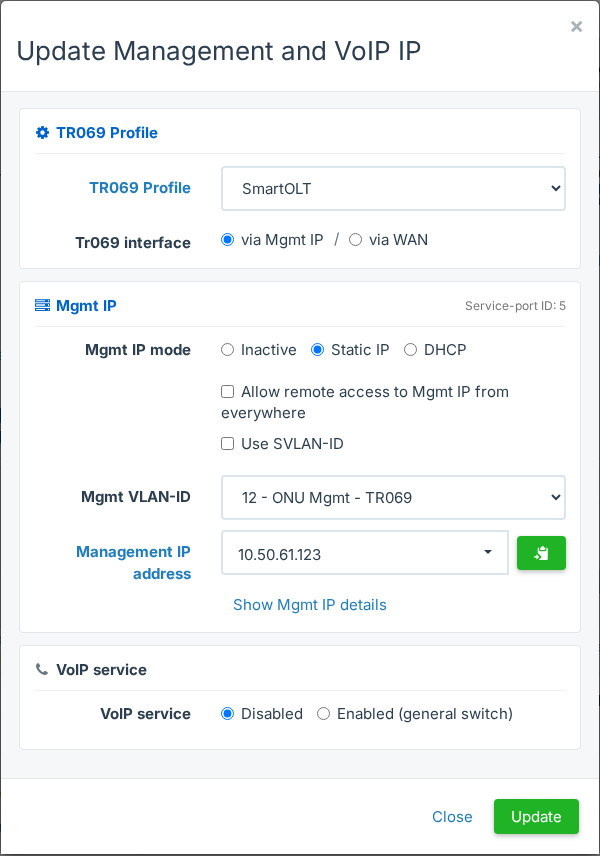
Open the ONU page and click the value next to Mgmt IP. In the Update Management and VoIP IP window, select Allow remote access to Mgmt IP from everywhere and click Update. If the OLT has access lists, the label ends in Access Lists instead, and only the addresses in those lists get access.
Remote access on the WAN IP
Enable WAN remote access in the WAN settings of the ONU, as in Configure WiFi and internet (WAN) on an ONU with TR-069. This field needs ONU mode set to Routing.
Limit who can connect
On the OLT page, the Remote ACLs tab holds the IP addresses that can reach the ONUs when remote access is on. Enter there the public addresses of your office, so that nobody else can connect.
Remote access from everywhere shows the login page of the ONU to the whole internet when the ONU has a public address. Limit the access with Remote ACLs, change the default web password of the ONU, and disable remote access when you finish. SmartOLT Magic remote works without remote access enabled on the ONU, so the ONU stays closed to the internet.